> For the complete documentation index, see [llms.txt](https://docs.xplorpay.com/llms.txt). Markdown versions of documentation pages are available by appending `.md` to page URLs; this page is available as [Markdown](https://docs.xplorpay.com/api-reference/api/merchant-onboarding/onboard-merchant/merchant-legal-documents.md).
# Merchant Legal Documents
The Legal Documents API allows you to retrieve, create, and manage legal documents required during merchant onboarding.
These documents include the merchant application, addendums, and other agreements that may require customer acknowledgment or signature.
Using legal documents API, you can:
* Retrieve available legal documents and their settings
* Display the latest document versions to users
* Submit signed documents for onboarding
{% hint style="danger" %}
Xplor Pay does not currently offer that determines which legal documents are required for a given application. You must implement this logic within your own system.
{% endhint %}
{% hint style="warning" %}
* Review any changes to the signature collection process with Xplor Pay before deploying to production.
* The Legal Documents endpoints have been introduced to replace the deprecated Signature endpoints. While the previous Signature endpoints remain functional for backward compatibility, developers should migrate to the Legal Documents endpoints for all new implementations.
* Early versions of the Legal Documents endpoints supported alternative routing through `/api/demographics/` in addition to the standard `/api/legaldocuments/` path. This dual-route support was maintained through application versions V1 and V2 but was removed in V3. All requests should now use the `/api/legaldocuments/` route.
{% endhint %}
### Configured legal documents
* Merchant Application - Required for all new merchants.
* PAYA Consent to Share - Required for merchants with one or more PAYA equipment orders.
* PAYA ACH Addendum - Required for merchants with one or more PAYA equipment orders.
* Xplor Pay TOS Addendum - Required for merchants with one or more Xplor Pay POS equipment orders.
* CBD Attestation - Required for merchants who sell CBD.
* Sporting Goods and Firearms Addendum - Required for merchants who sell either firearms or firearms accessories.
* Empower Attestation - Required for merchants participating in the Empower program.
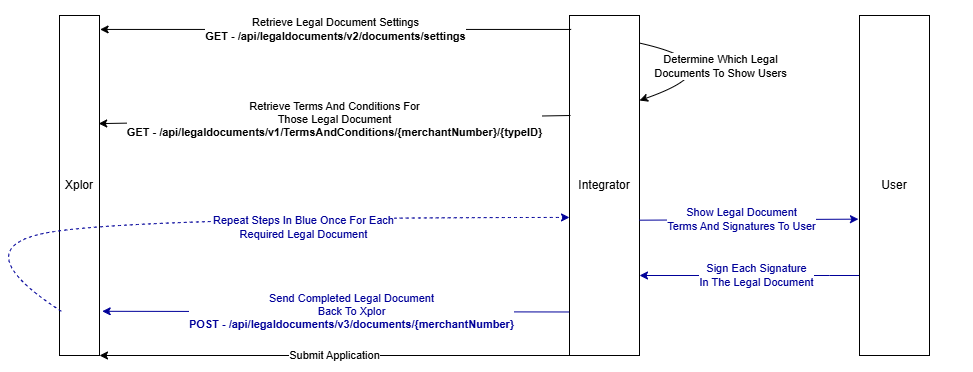
### Typical workflow
1. Retrieve the list of legal documents and their settings.
2. Identify the legal documents to show to the signer.
3. Retrieve and display the terms and conditions to the signer.
4. Submit the signed documents to Xplor Pay.
* [Documents](/api-reference/api/merchant-onboarding/onboard-merchant/merchant-legal-documents/documents.md)
* [Terms and Conditions](/api-reference/api/merchant-onboarding/onboard-merchant/merchant-legal-documents/terms-and-conditions.md)
---
# Agent Instructions
This documentation is published with GitBook. GitBook is the documentation platform designed so that both humans and AI agents can read, navigate, and reason over technical content effectively. Learn more at gitbook.com.
## Querying This Documentation
If you need additional information that is not directly available in this page, you can query the documentation by asking a question.
Perform an HTTP GET request on the following URL with the `ask` and `goal` query parameters:
```
GET https://docs.xplorpay.com/api-reference/api/merchant-onboarding/onboard-merchant/merchant-legal-documents.md?ask=&goal=
```
`ask` is the immediate question: it should be specific, self-contained, and written in natural language.
`goal` is what the user is ultimately trying to achieve, the reason they need the answer. Sharing it helps GitBook give you a better, more relevant answer. A goal is most helpful when it describes the outcome the user wants rather than restating the question. For example, with `ask=how do I create an API token`, a goal like `automate deployments from our CI pipeline` lets GitBook tailor the answer to that use case.
The response will contain a direct answer to the question and relevant excerpts and sources from the documentation.
Use this mechanism when the answer is not explicitly present in the current page, you need clarification or additional context, or you want to retrieve related documentation sections.