> For the complete documentation index, see [llms.txt](https://docs.xplorpay.com/llms.txt). Markdown versions of documentation pages are available by appending `.md` to page URLs; this page is available as [Markdown](https://docs.xplorpay.com/guides/javascript/idtech-vp8300.md).
# IDTech VP8300
The **JavaScript SDK** supports an IDTech VP8300 card reader for payments acceptance. This card reader supports three interaction methods:
* Contactless
* Chip
* Swipe
{% hint style="warning" %}
Ensure the **VP8300** card reader has a USB connection to communicate with the JavaScript SDK.
{% endhint %}
## Prerequisites
Before using the **VP8300** card reader, make sure you have the following:
:white\_check\_mark: Use a device with Windows or macOS that includes a USB port.
:white\_check\_mark: Serve your application over HTTPS in both development and production environments.
:white\_check\_mark: Your domain must have a valid SSL certificate.
:white\_check\_mark: Implement the manual card entry of the JavaScript SDK solution.
## Process payment
To process payment using the IDTech VP8300:
{% stepper %}
{% step %}
Add the `ClearentSDK.init()` function that has the `enableReader` flag set to `true` and the `deviceType` set to `IDTECH`.
{% code lineNumbers="true" %}
```javascript
ClearentSDK.init({
"baseUrl": "https://gateway-int.clearent.net",
"pk": "YOUR PUBLIC KEY GOES HERE"
"enableReader":true,
"deviceType": "IDTECH"
});
```
{% endcode %}
{% endstep %}
{% step %}
Plug the card reader into a USB port on your device.
{% hint style="info" %}
Use an external adapter if your device does not have a USB port.
{% endhint %}
{% endstep %}
{% step %}
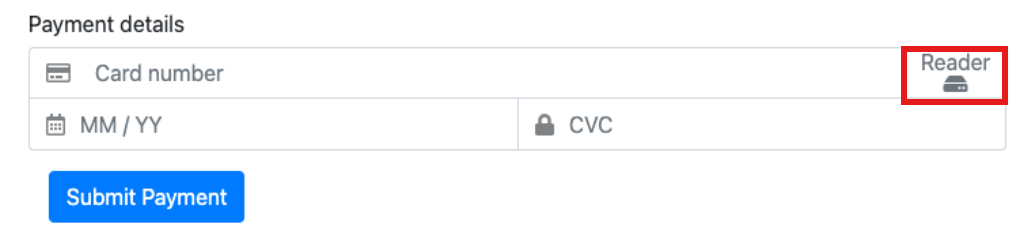
Select the **Reader** button next to the Card Number input field to complete the entry of card details into the fields of the payment form.
Payment form
{% endstep %}
{% step %}
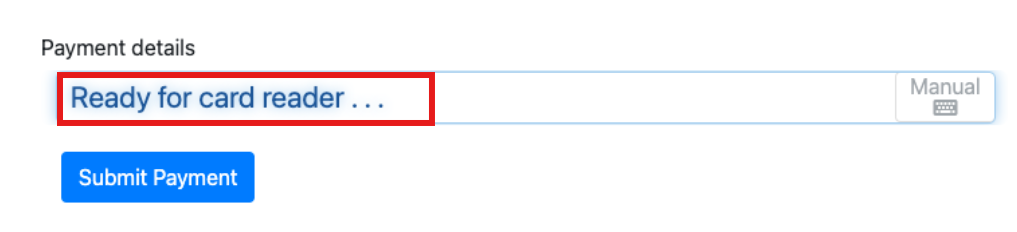
Present the card when you see the **Ready for card reader…** message on the payment form.
Payment form
{% hint style="warning" %}
Do not present the card to the reader unless you see the message ‘**Ready for card reader…**’ on the Payment Details form to avoid incorrectly filling the card data into the fields.
{% endhint %}
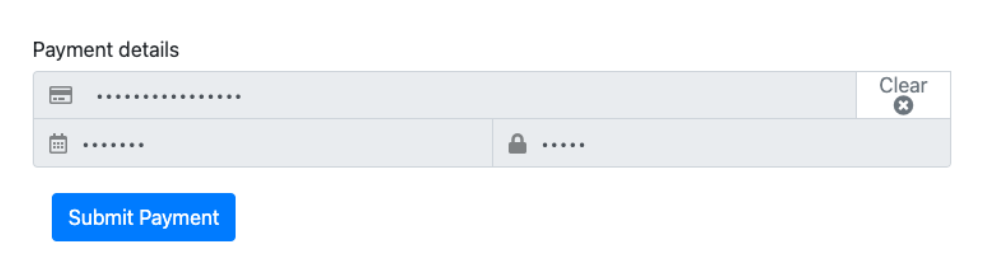
The **Payment Details** section displays the masked information in the fields.
Payment form
{% hint style="info" %}
To clear the information from all fields in the Payment Details form, select the **Clear** button in the upper-right corner.
{% endhint %}
{% endstep %}
{% step %}
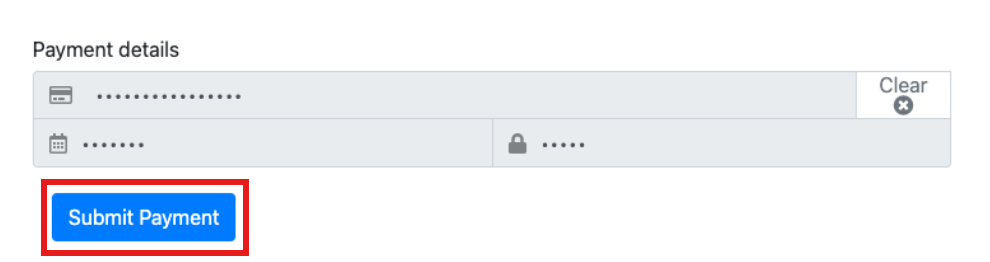
Select the **Submit Payment** button.
Payment form
{% endstep %}
{% endstepper %}
{% hint style="warning" %}
The `success` and `error` functions are triggered when you call the mobile JWT or ACH mobile JWT to create a secure JWT, which presents the card or ACH data. See [ACH Transaction](broken://pages/X6kTUpELT9JPOuCTZCKi) for more information.
{% endhint %}
## Connect HID Mode
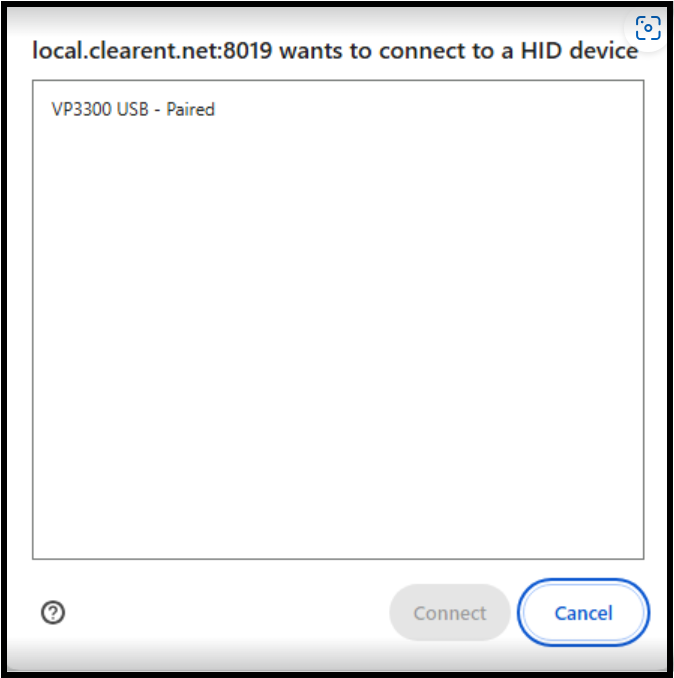
When you connect to the [VP8300](https://idtechproducts.com/products/vp8300/) in HID mode, a security window appears in your browser. This window allows you to select the terminal for connecting to the VP8300 in HID mode, enabling access to the [VP8300](https://idtechproducts.com/products/vp8300/) device.
Before connecting to the [VP8300](https://idtechproducts.com/products/vp8300/) in HID mode, you must:
:white\_check\_mark:Set the [VP8300](https://idtechproducts.com/products/vp8300/) Card Reader to HID mode.
:white\_check\_mark: Enable the `is-hid-reader-enabled` field on the terminal of your public key.
---
# Agent Instructions
This documentation is published with GitBook. GitBook is the documentation platform designed so that both humans and AI agents can read, navigate, and reason over technical content effectively. Learn more at gitbook.com.
## Querying This Documentation
If you need additional information that is not directly available in this page, you can query the documentation dynamically by asking a question.
Perform an HTTP GET request on the current page URL with the `ask` query parameter, and the optional `goal` query parameter:
```
GET https://docs.xplorpay.com/guides/javascript/idtech-vp8300.md?ask=&goal=
```
`ask` is the immediate question: it should be specific, self-contained, and written in natural language.
`goal` is optional and describes the broader end goal you are ultimately trying to accomplish on behalf of the user. GitBook uses it to tailor the answer towards what is most useful for that goal.
The response will contain a direct answer to the question and relevant excerpts and sources from the documentation.
Use this mechanism when the answer is not explicitly present in the current page, you need clarification or additional context, or you want to retrieve related documentation sections.
 Before connecting to the [VP8300](https://idtechproducts.com/products/vp8300/) in HID mode, you must:
:white\_check\_mark:Set the [VP8300](https://idtechproducts.com/products/vp8300/) Card Reader to HID mode.
:white\_check\_mark: Enable the `is-hid-reader-enabled` field on the terminal of your public key.
---
# Agent Instructions
This documentation is published with GitBook. GitBook is the documentation platform designed so that both humans and AI agents can read, navigate, and reason over technical content effectively. Learn more at gitbook.com.
## Querying This Documentation
If you need additional information that is not directly available in this page, you can query the documentation dynamically by asking a question.
Perform an HTTP GET request on the current page URL with the `ask` query parameter, and the optional `goal` query parameter:
```
GET https://docs.xplorpay.com/guides/javascript/idtech-vp8300.md?ask=
Before connecting to the [VP8300](https://idtechproducts.com/products/vp8300/) in HID mode, you must:
:white\_check\_mark:Set the [VP8300](https://idtechproducts.com/products/vp8300/) Card Reader to HID mode.
:white\_check\_mark: Enable the `is-hid-reader-enabled` field on the terminal of your public key.
---
# Agent Instructions
This documentation is published with GitBook. GitBook is the documentation platform designed so that both humans and AI agents can read, navigate, and reason over technical content effectively. Learn more at gitbook.com.
## Querying This Documentation
If you need additional information that is not directly available in this page, you can query the documentation dynamically by asking a question.
Perform an HTTP GET request on the current page URL with the `ask` query parameter, and the optional `goal` query parameter:
```
GET https://docs.xplorpay.com/guides/javascript/idtech-vp8300.md?ask=