> For the complete documentation index, see [llms.txt](https://docs.xplorpay.com/llms.txt). Markdown versions of documentation pages are available by appending `.md` to page URLs; this page is available as [Markdown](https://docs.xplorpay.com/guides/javascript/process-payment.md).
# Process payment
A secure, signed JSON Web Token ([JWT](#jwt)) is generated when the customer selects the **Submit** button on your [payment form](/guides/javascript/add-payment-form.md).
To receive a secure and signed [JWT](#jwt) and complete the payment on your backend:
{% stepper %}
{% step %}
Call the `ClearentSDK.getPaymentToken` method.
{% code lineNumbers="true" %}
```javascript
ClearentSDK.getPaymentToken();
```
{% endcode %}
{% endstep %}
{% step %}
Add `Promises` to receive the success or error message from the `ClearentSDK.getPaymentToken()` function.
{% code lineNumbers="true" %}
```javascript
ClearentSDK.getPaymentToken().then(
(result) => {
// this function is called if getting a payment token was successful
console.log("ClearentTokenSuccess");
console.log(result);
},
(error) => {
// this function is called if getting a payment token failed
console.log("ClearentTokenError");
console.log(error);
}
);
```
{% endcode %}
{% endstep %}
{% step %}
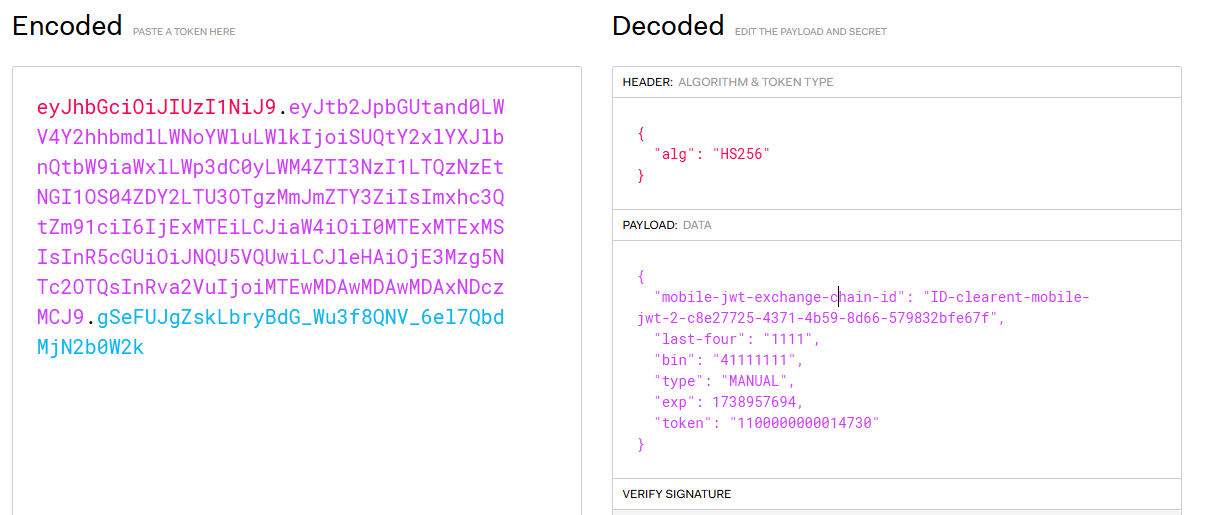
Call the JWT service using the `ClearentTokenSuccess` function to receive the secure, signed, and unencrypted JSON Web Token in the [JWT](#example-decoded-unencrypted-signed-jwt) field shown below.
{% code lineNumbers="true" %}
```javascript
{
"code":"200",
"status":"success",
"exchange-id":"ID-clearent-mobile-jwt-1-c32bfe39-d454-4e34-8b4f-94d850643e48",
"payload":{
"mobile-jwt":{
"jwt":"eyJhbGciOi23UzIh4iJ9.eyJsYXN0LWZvdXIiOiIxMrkP8iwid
HlwZSI6Ik1BTlVBTCIsImV4cCI6MTU0NzY0NjU2MSwidG9rZW4iOiIxMTAwMDAw
MDAwMDEzNTkyIn0.eT8c_5yUzxCxL2MEtmbG444eTFRW7OxzRF7x4uRIo-U",
"last-four":"1111"
},
"payloadType":"mobile-jwt"
}
}
```
{% endcode %}
{% endstep %}
{% step %}
Send request to the [Mobile Transactions](/api-reference/api/payments/mobile/mobile-payment-transactions/mobile-transactions.md) API endpoint from your backend using the `mobilejwt` field and `api-key` provided to you.
{% code lineNumbers="true" %}
```json
POST /rest/v2/mobile/transactions/sale
Accept:application/json
Content-Type:application/json
api-key:YOUR_API_KEY_GOES_HERE
mobilejwt:eyJhbGciOi23UzIh4iJ9.eyJsYXN0LWZvdXIiOiIxMrkP8iwid
HlwZSI6Ik1BTlVBTCIsImV4cCI6MTU0NzY0NjU2MSwidG9rZW4iOiIxMTAw
MDAwMDAwMDEzNTkyIn0.eT8c_5yUzxCxL2MEtmbG444eTFRW7OxzRF7x4uRIo-U
Body
{
"type": "SALE",
"amount": "15.55",
"software-type": "AwesomePOSSoftware",
"software-type-version":"1"
}
```
{% endcode %}
{% endstep %}
{% endstepper %}
You will receive the below response after successful transaction or an error response if the transaction fails.
{% code lineNumbers="true" %}
```json
{
"code": "200",
"status": "success",
"exchange-id": "ID-clearent-mobile-gateway-1-2a6b56d3-c660-4810-95ea-9fb9a21c6634",
"payload": {
"transaction": {
"amount": "15.55",
"id": "2586119",
"type": "SALE",
"result": "APPROVED",
"card": "XXXXXXXXXXXX1111",
"csc": "999",
"authorization-code": "TAS022",
"batch-string-id": "938",
"display-message": "Transaction approved",
"result-code": "000",
"exp-date": "1220",
"software-type": "AwesomePOSSoftware",
"card-type": "VISA",
"last-four": "1111"
},
"payloadType": "transaction"
}
}
```
{% endcode %}
**Example**: Decoded, unencrypted, and signed JSON Web Token (JWT)
Example: Decoded, unencrypted, signed JWT
---
# Agent Instructions
This documentation is published with GitBook. GitBook is the documentation platform designed so that both humans and AI agents can read, navigate, and reason over technical content effectively. Learn more at gitbook.com.
## Querying This Documentation
If you need additional information that is not directly available in this page, you can query the documentation dynamically by asking a question.
Perform an HTTP GET request on the current page URL with the `ask` query parameter, and the optional `goal` query parameter:
```
GET https://docs.xplorpay.com/guides/javascript/process-payment.md?ask=&goal=
```
`ask` is the immediate question: it should be specific, self-contained, and written in natural language.
`goal` is optional and describes the broader end goal you are ultimately trying to accomplish on behalf of the user. GitBook uses it to tailor the answer towards what is most useful for that goal.
The response will contain a direct answer to the question and relevant excerpts and sources from the documentation.
Use this mechanism when the answer is not explicitly present in the current page, you need clarification or additional context, or you want to retrieve related documentation sections.