# Managing virtual terminal
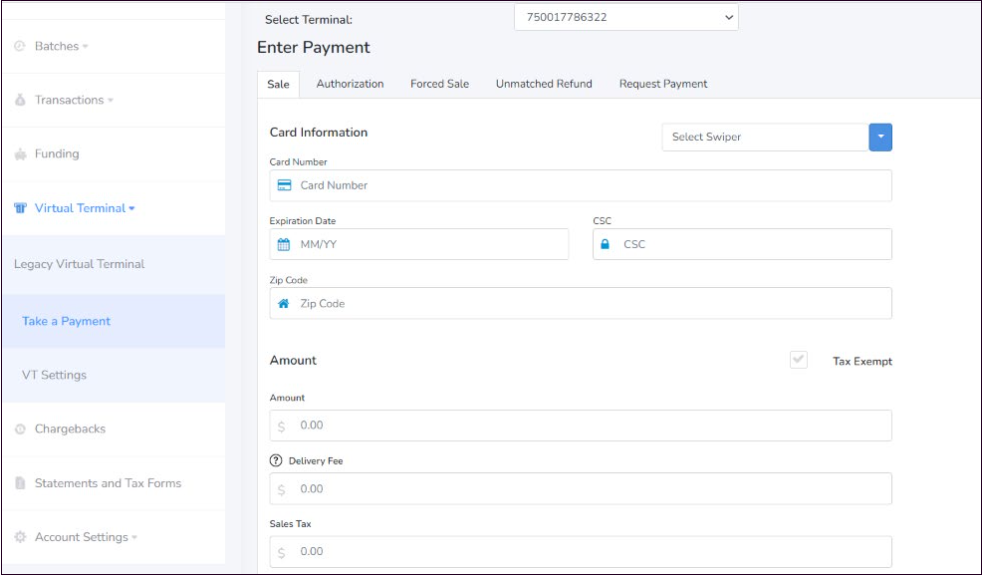
**Virtual Terminal** page offers merchants to process credit card payments manually through a web browser on their computer, tablet, or mobile device. The Virtual Terminal page allows you to accept payments online without any additional equipment. It is user-friendly, mobile-responsive, and serves as a back-office management tool. Key features include:
* Take a Payment
* Transaction search
* Open Batches
* VT Settings
Screenshot: Virtual Terminal
After selecting a Merchant ID and Terminal ID, merchants can initiate a transaction by navigating to the respective tab and entering the required details for one of the following transaction types:
* Sale
* Authorization
* Force Sale
* Unmatched Refund
* Request Payment
To learn more, see [Virtual Terminal](https://docs.xplorpay.com/merchant-portal/guides/virtual-terminal).
---
# Agent Instructions: Querying This Documentation
If you need additional information that is not directly available in this page, you can query the documentation dynamically by asking a question.
Perform an HTTP GET request on the current page URL with the `ask` query parameter:
```
GET https://docs.xplorpay.com/merchant-portal/merchant-portal/core-features/managing-virtual-terminal.md?ask=
```
The question should be specific, self-contained, and written in natural language.
The response will contain a direct answer to the question and relevant excerpts and sources from the documentation.
Use this mechanism when the answer is not explicitly present in the current page, you need clarification or additional context, or you want to retrieve related documentation sections.