# Managing merchants
The Merchants page provides a centralized view of all associated merchants, enabling partners to efficiently manage accounts and track performance. Merchant’s interface allows users to search, view, and access merchant details, facilitating streamlined portfolio management.
With direct access to key merchant data, partners can:
* Track sales performance and transaction history for informed decision-making.
* Monitor business growth trends and take proactive actions to support merchants.
* Maintain streamlined communication by having instant access to merchant records.
### **Navigating the Merchants Page**
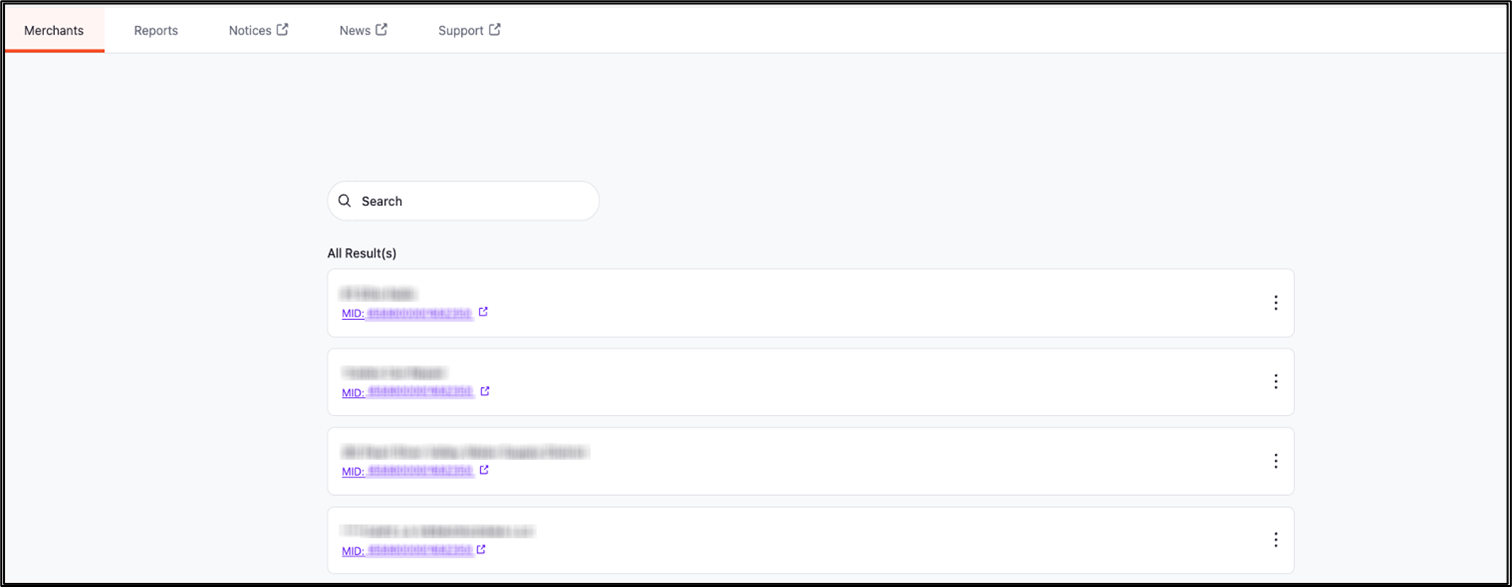
Upon selecting the Merchants tab from the main navigation menu, users are directed to a structured list of all registered merchants. The interface includes:
* **Search functionality** – A search bar at the top allows users to quickly locate specific merchants by name or MID (Merchant ID).
* **Merchant listings** – Merchants are displayed in an organized list format, showing their Business Name and MID (Merchant Identification Number).
* **External links** – Clicking on a merchant’s MID redirects users to a detailed merchant profile, where additional business insights and transaction details are available.
* **Action menu** – A three-dot menu next to each merchant entry may provide quick access to additional actions, such as editing details, viewing reports, or managing account settings (if applicable).
### Key features for merchant management
1. **Merchant search and filtering**
* Quickly find merchants using keywords or MID-based searches.
* Refine search results based on transaction volume, business type, or activation status (if filtering options are available).
2. **Merchant profile access**
* Click on a MID to access detailed business data, transaction insights, and historical performance metrics.
3. **Merchant profile access**
* View all associated merchants in one place, reducing administrative overhead and improving efficiency.
* Identify duplicate or inactive accounts for better data management.
---
# Agent Instructions: Querying This Documentation
If you need additional information that is not directly available in this page, you can query the documentation dynamically by asking a question.
Perform an HTTP GET request on the current page URL with the `ask` query parameter:
```
GET https://docs.xplorpay.com/partner-portal/partner-portal/core-features/managing-merchants.md?ask=
```
The question should be specific, self-contained, and written in natural language.
The response will contain a direct answer to the question and relevant excerpts and sources from the documentation.
Use this mechanism when the answer is not explicitly present in the current page, you need clarification or additional context, or you want to retrieve related documentation sections.