# Configuring Pricing Details
The **Pricing** section allows you to configure the merchant's pricing model, card type acceptance, fees, and other settlement-related details.
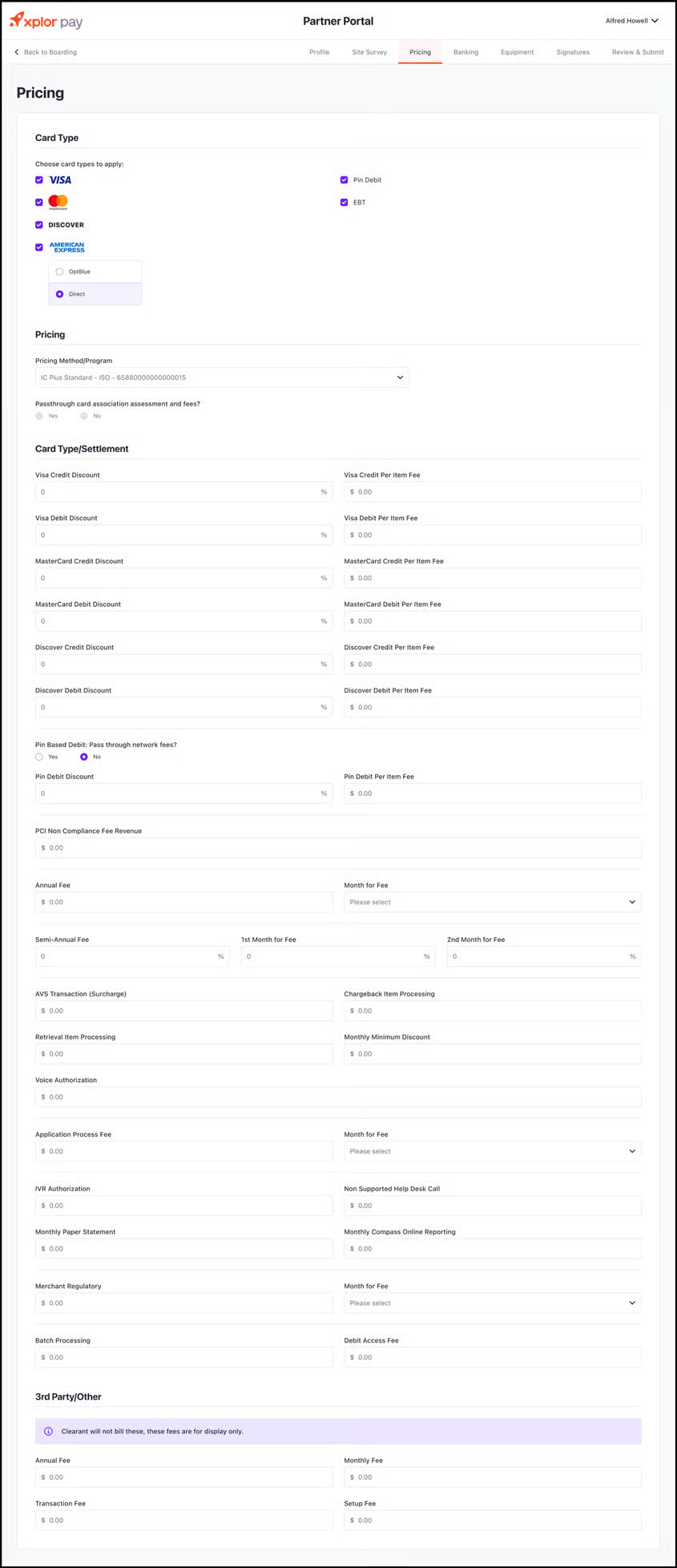 {% stepper %}
{% step %}
**Select Card Types to Accept**
* Choose the card types that the merchant will accept for transactions:
* **Visa**
* **MasterCard**
* **Discover**
* **American Express** (Choose between **OptBlue** or **Direct**)
* **Pin Debit**
* **EBT (Electronic Benefits Transfer)**
{% endstep %}
{% step %}
**Select Pricing Method/Program**
* Choose the **Pricing Method/Program** from the dropdown menu (e.g., IC Plus Standard – ISO).
{% endstep %}
{% step %}
#### **Configure Card Association Assessment and Fees**
* Select **Yes**/**No** for **Passthrough card association assessment and fees**.
{% endstep %}
{% step %}
**Set Card Type/Settlement Fees**
Enter the fee values for each card type:
* **Visa Credit & Debit Discounts** (Percentage and Per Item Fee)
* **MasterCard Credit & Debit Discounts** (Percentage and Per Item Fee)
* **Discover Credit & Debit Discounts** (Percentage and Per Item Fee)
* **Pin Debit** – Choose whether to pass through network fees (**Yes/No**) and enter the applicable percentage and per-item fee.
{% endstep %}
{% step %}
**Additional Fees & Discounts**
Enter applicable fees, if any, such as:
* PCI Non-Compliance Fee Revenue
* Annual Fee
* Semi-Annual Fee
* First and Second Month Fees
* AVS Transaction (Surcharge)
* Chargeback Item Processing
* Retrieval Item Processing
* Monthly Minimum Discount
* Voice Authorization Fee
* Application Processing Fee
{% endstep %}
{% step %}
#### **Other Fees**
* IVR Authorization Fee
* Non-Supported Help Desk Call Fee
* Monthly Paper Statement Fee
* Monthly Compass Online Reporting Fee
* Merchant Regulatory Fees
* Batch Processing Fees
* Debit Access Fee
{% endstep %}
{% step %}
**3rd Party/Other Fees**
* Xplor Pay does not bill these fees directly; they are for display only.
* Enter details such as:
* **Annual Fee**
* **Monthly Fee**
* **Transaction Fee**
* **Setup Fee**
{% endstep %}
{% step %}
#### **Save and Proceed**
* Click **Save** to apply the pricing settings.
* Click **Next** to continue to the **Banking Information** section.
{% endstep %}
{% endstepper %}
{% stepper %}
{% step %}
**Select Card Types to Accept**
* Choose the card types that the merchant will accept for transactions:
* **Visa**
* **MasterCard**
* **Discover**
* **American Express** (Choose between **OptBlue** or **Direct**)
* **Pin Debit**
* **EBT (Electronic Benefits Transfer)**
{% endstep %}
{% step %}
**Select Pricing Method/Program**
* Choose the **Pricing Method/Program** from the dropdown menu (e.g., IC Plus Standard – ISO).
{% endstep %}
{% step %}
#### **Configure Card Association Assessment and Fees**
* Select **Yes**/**No** for **Passthrough card association assessment and fees**.
{% endstep %}
{% step %}
**Set Card Type/Settlement Fees**
Enter the fee values for each card type:
* **Visa Credit & Debit Discounts** (Percentage and Per Item Fee)
* **MasterCard Credit & Debit Discounts** (Percentage and Per Item Fee)
* **Discover Credit & Debit Discounts** (Percentage and Per Item Fee)
* **Pin Debit** – Choose whether to pass through network fees (**Yes/No**) and enter the applicable percentage and per-item fee.
{% endstep %}
{% step %}
**Additional Fees & Discounts**
Enter applicable fees, if any, such as:
* PCI Non-Compliance Fee Revenue
* Annual Fee
* Semi-Annual Fee
* First and Second Month Fees
* AVS Transaction (Surcharge)
* Chargeback Item Processing
* Retrieval Item Processing
* Monthly Minimum Discount
* Voice Authorization Fee
* Application Processing Fee
{% endstep %}
{% step %}
#### **Other Fees**
* IVR Authorization Fee
* Non-Supported Help Desk Call Fee
* Monthly Paper Statement Fee
* Monthly Compass Online Reporting Fee
* Merchant Regulatory Fees
* Batch Processing Fees
* Debit Access Fee
{% endstep %}
{% step %}
**3rd Party/Other Fees**
* Xplor Pay does not bill these fees directly; they are for display only.
* Enter details such as:
* **Annual Fee**
* **Monthly Fee**
* **Transaction Fee**
* **Setup Fee**
{% endstep %}
{% step %}
#### **Save and Proceed**
* Click **Save** to apply the pricing settings.
* Click **Next** to continue to the **Banking Information** section.
{% endstep %}
{% endstepper %}